1. SageMaker Pipelines
SageMaker Pipelines is a purpose-built CI/CD service for ML. It defines, orchestrates, and automates end-to-end ML workflows.
Core Concept Pipelines = CI/CD for ML. Define repeatable ML workflows as code: data processing → training → evaluation → conditional approval → deployment. Pipelines run automatically when triggered (new data, schedule, or manual). They enable reproducible, auditable ML.
Pipeline Steps
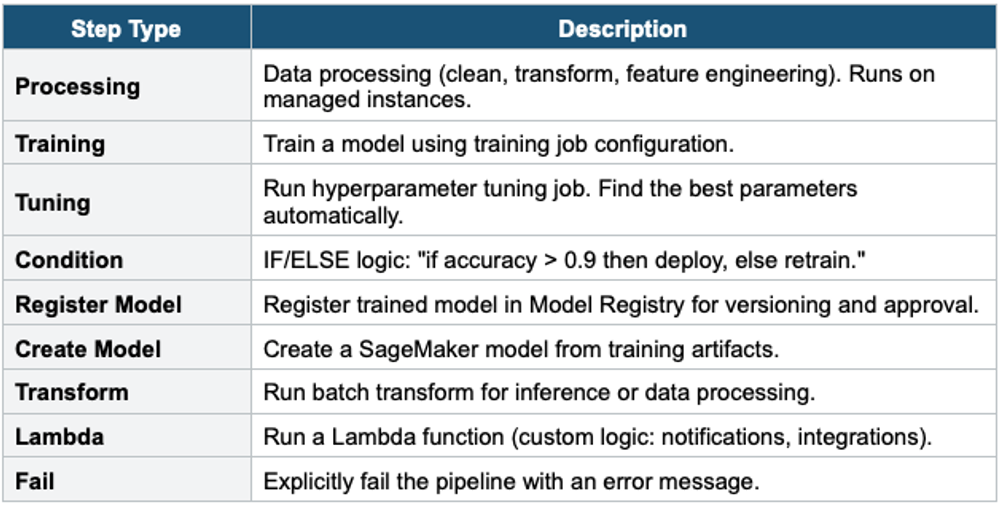
SageMaker Pipeline Example:

Step 1: Processing — Clean data, feature engineering → S3
Step 2: Training — Train the XGBoost model on the processed data
Step 3: Evaluation — Evaluate model on test set
Step 4: Condition — IF accuracy >= 0.9:
  Step 5a: Register Model → Model Registry (Pending Approval)
  Step 5b: Lambda → notify team via SNS
ELSE:
  Step 6: Fail — "Model accuracy below threshold"

After manual approval in the Model Registry:
  Deploy to SageMaker Endpoint (via CodePipeline or Lambda)
2. Model Registry
- Central repository for trained model versions
- Track: model artifacts (S3), metadata, metrics, lineage, approval status
- Approval workflow: PendingManualApproval → Approved → deploy to production
- Model groups: organize versions of the same model
- Integration with Pipelines: register model at the end of the pipeline, manual approval before deployment
- Use for: model versioning, governance, reproducibility, audit trail
3. SageMaker Model Monitor
Model Monitor detects issues with models in production: data drift, model quality degradation, bias, and feature attribution changes.
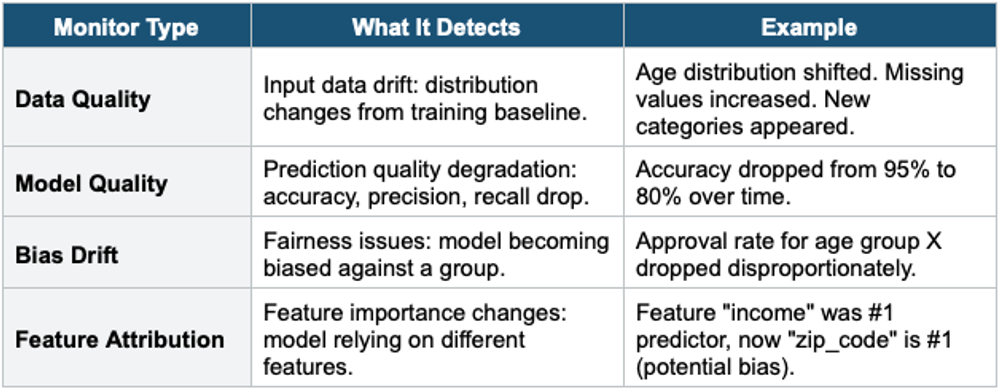
- Runs on a schedule (hourly, daily) or continuously
- Compares current data/predictions against a baseline (captured during training)
- Sends alerts via CloudWatch when violations are detected
- Use for: production model governance, regulatory compliance, catching degradation early
4. SageMaker Clarify
- Detect bias in data and models. Explain model predictions.
- Pre-training bias detection: detect bias in training data before training
- Post-training bias detection: detect bias in model predictions
- Model explainability: SHAP values showing which features influenced each prediction
- Use for: responsible AI, regulatory compliance (explain why a loan was denied), fairness audits
5.SageMaker Feature Store
Feature Store is a centralized repository for ML features that enables sharing and reuse across teams and models.
Core Concept Features are the processed input variables used by ML models (e.g., customer_age, avg_order_value, days_since_last_login). Without Feature Store, each team re-creates the same features differently (inconsistency). Feature Store provides one source of truth for features, ensuring consistency between training and inference.
Two Stores
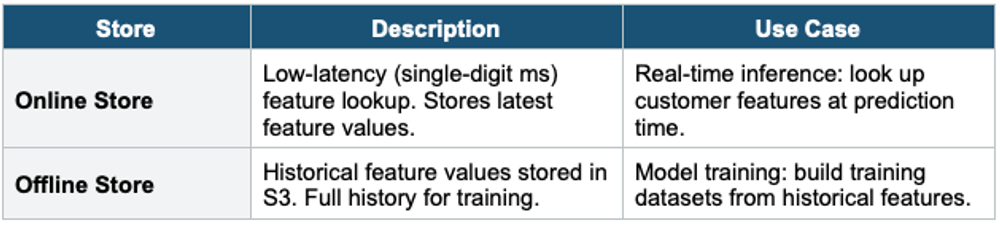
- Feature Groups: collections of related features (customer_features, transaction_features)
- Ingest features from: Glue, Spark, SageMaker Processing, Kinesis, direct API
- Time-travel queries: retrieve features as they existed at a specific point in time
- Share across teams: one team creates features, all teams reuse them
- Training-serving consistency: same feature definitions used in training and inference
6. SageMaker Experiments
- Track, compare, and organize ML experiments
- Log: hyperparameters, metrics, artifacts, code versions for each training run
- Compare: visualize performance across experiments side by side
- Lineage: trace from the deployed model back to the training data and code
- Integration: automatic logging from SageMaker Training and Pipelines
7. Complete MLOps Workflow
SageMaker MLOps Workflow:

1. PREPARE
   Data Wrangler: clean + transform data
   Feature Store: store reusable features

2. BUILD
   Studio Notebooks: develop model code
   Experiments: track experiment runs

3. TRAIN + TUNE
   Training Jobs: managed compute (Spot for savings)
   Hyperparameter Tuning: find the best parameters

4. EVALUATE
   Clarify: bias detection + explainability
   Model Monitor baseline: capture training data distribution

5. REGISTER
   Model Registry: version + approval workflow
   Pipeline: automate steps 1–5

6. DEPLOY
   Endpoint: real-time/serverless / batch / async
   A/B testing: production variants

7. MONITOR
   Model Monitor: data drift, model quality, bias drift
   CloudWatch alarms: alert on violations
   Retrain trigger: Pipeline re-runs on drift detection
Exam Tip MLOps: "CI/CD for ML" = SageMaker Pipelines. "Model versioning + approval" = Model Registry. "Detect data drift in production" = Model Monitor (Data Quality). "Detect model bias" = Clarify. "Explain predictions" = Clarify (SHAP). "Reuse features across teams" = Feature Store. "Track experiments" = SageMaker Experiments. "No-code ML" = Canvas / Autopilot. "Automate end-to-end" = Pipelines + Registry + Monitor.