1. Why Security Logging Matters
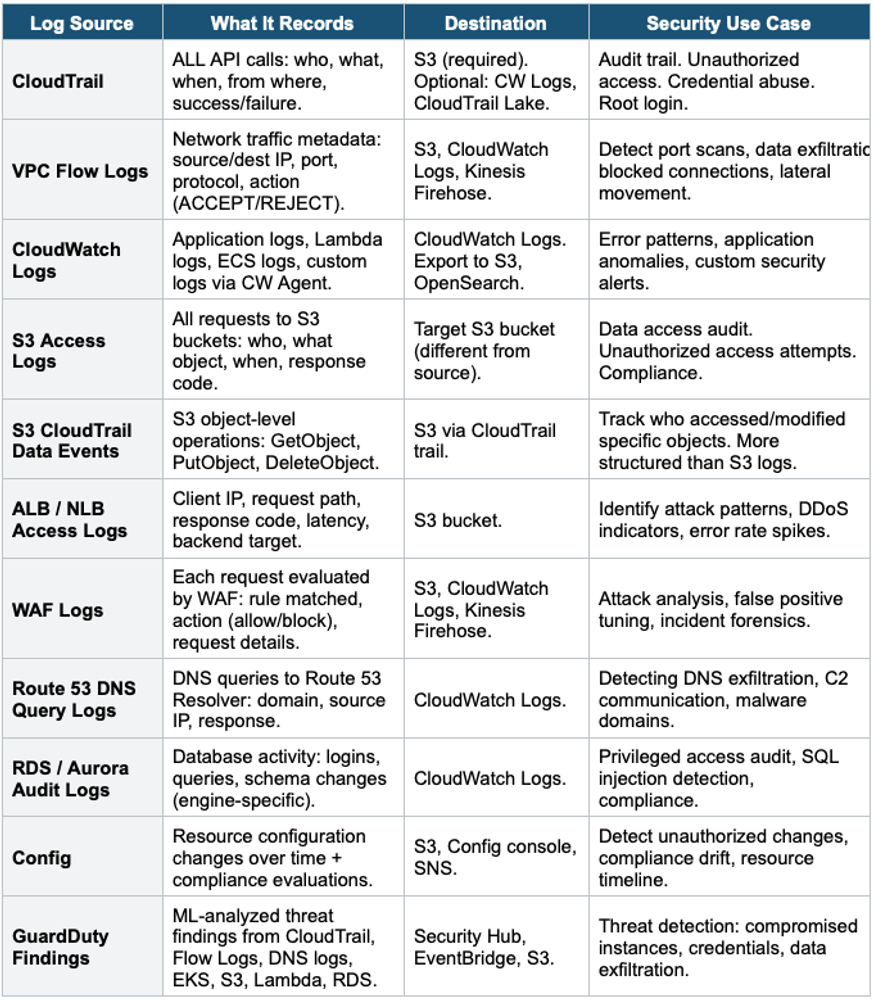
Comprehensive logging is the foundation of security on AWS. Without logs, you cannot detect threats, investigate incidents, prove compliance, or automate response. AWS provides a rich ecosystem of log sources that, when combined, give complete visibility into your environment.
Core Principle Log EVERYTHING, centralize EVERYTHING, retain for compliance, alert on anomalies, automate responses. The complete security visibility stack: CloudTrail (who did what), VPC Flow Logs (network traffic), CloudWatch Logs (application + service logs), GuardDuty (threat intelligence), Config (resource state), S3 Access Logs (data access), DNS Logs (domain queries).
2. AWS Security Log Sources
3. Centralized Logging Architecture
Centralized Security Logging Architecture:

  Account A (Production)          Account B (Development)
    CloudTrail ─┐                   CloudTrail ─┐
    VPC Flow    |                   VPC Flow    |
    Config      |                   Config      |
    CW Logs     |                   CW Logs     |
               |                               |
  └────────────┴───────────────────────────┘
                       |
            Log Archive Account (Security OU)
               |              |
          S3 Buckets      CloudWatch Logs
          (centralized)   (cross-account)
               |
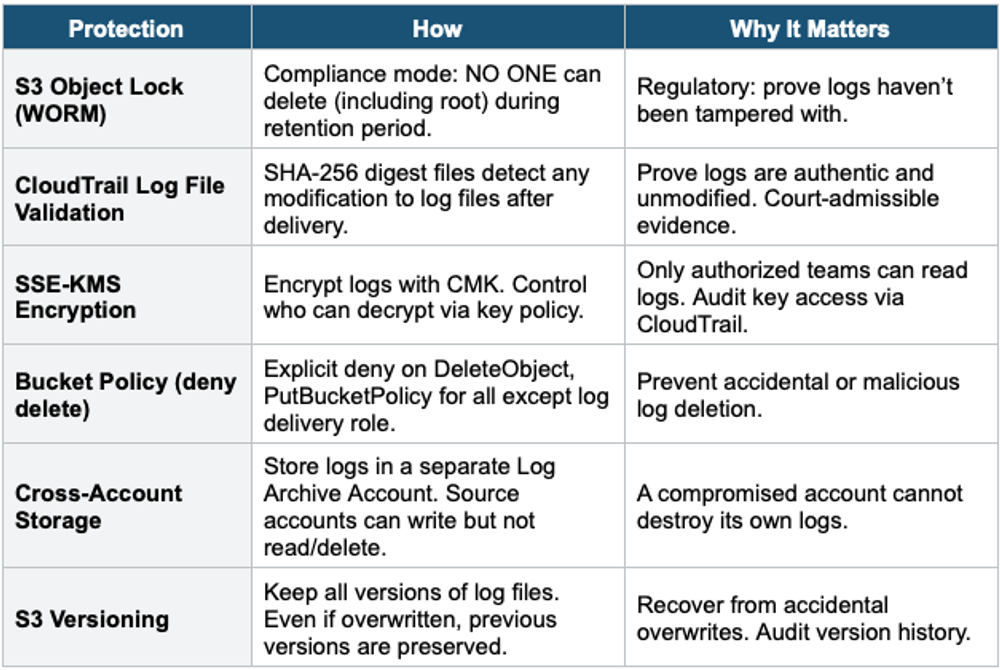
    S3 Object Lock (WORM - prevent deletion)
    SSE-KMS encryption (customer-managed key)
    Bucket policy: deny delete, deny modify, allow PutObject only
    Lifecycle: move to Glacier after 90 days
               |
          Analysis Layer:
            Athena (SQL queries on CloudTrail/Flow Logs)
            OpenSearch (real-time dashboards)
            Security Hub (aggregated findings)
            Detective (investigation)
            QuickSight (compliance dashboards)
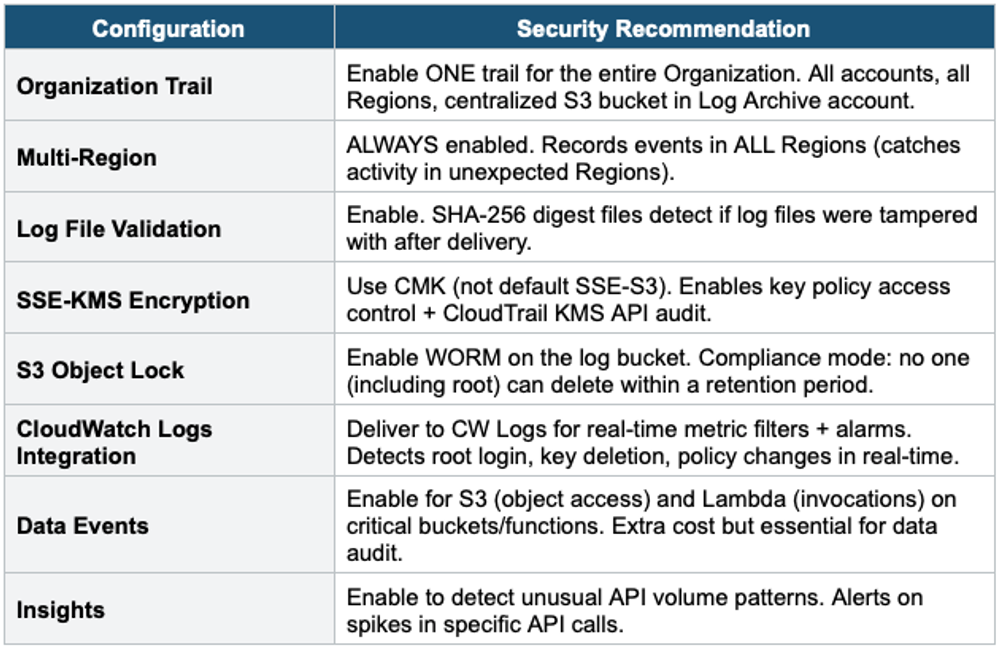
Centralized Logging Best Practice All logs from ALL accounts flow to a dedicated Log Archive Account in the Security OU. This account is locked down: no one can delete or modify logs. Use: Organization CloudTrail trail, cross-account CW Logs subscriptions, S3 bucket policies with explicit deny delete, S3 Object Lock for WORM compliance, and KMS encryption. This is the AWS-recommended architecture and a Control Tower default.
4. CloudTrail Security Configuration
5. Critical CloudWatch Metric Filters
Create metric filters on CloudTrail logs delivered to CloudWatch Logs. Each filter triggers an alarm + SNS notification when the pattern matches.
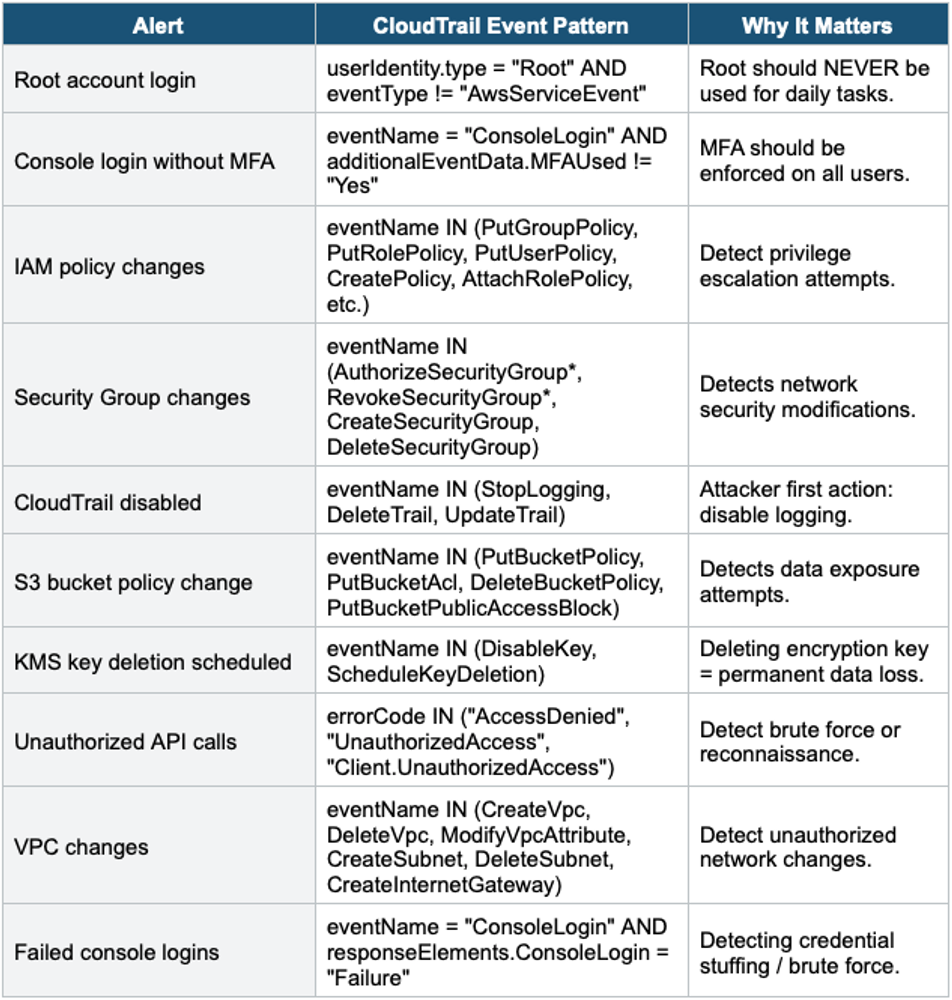
Important Warning CIS AWS Foundations Benchmark requires these metric filters + alarms as a minimum. Security Hub’s CIS Benchmark standard automatically checks if these are configured. If they’re missing, Security Hub reports FAILED findings. Implementing these is both a best practice and a compliance requirement.
6. Security Monitoring Services
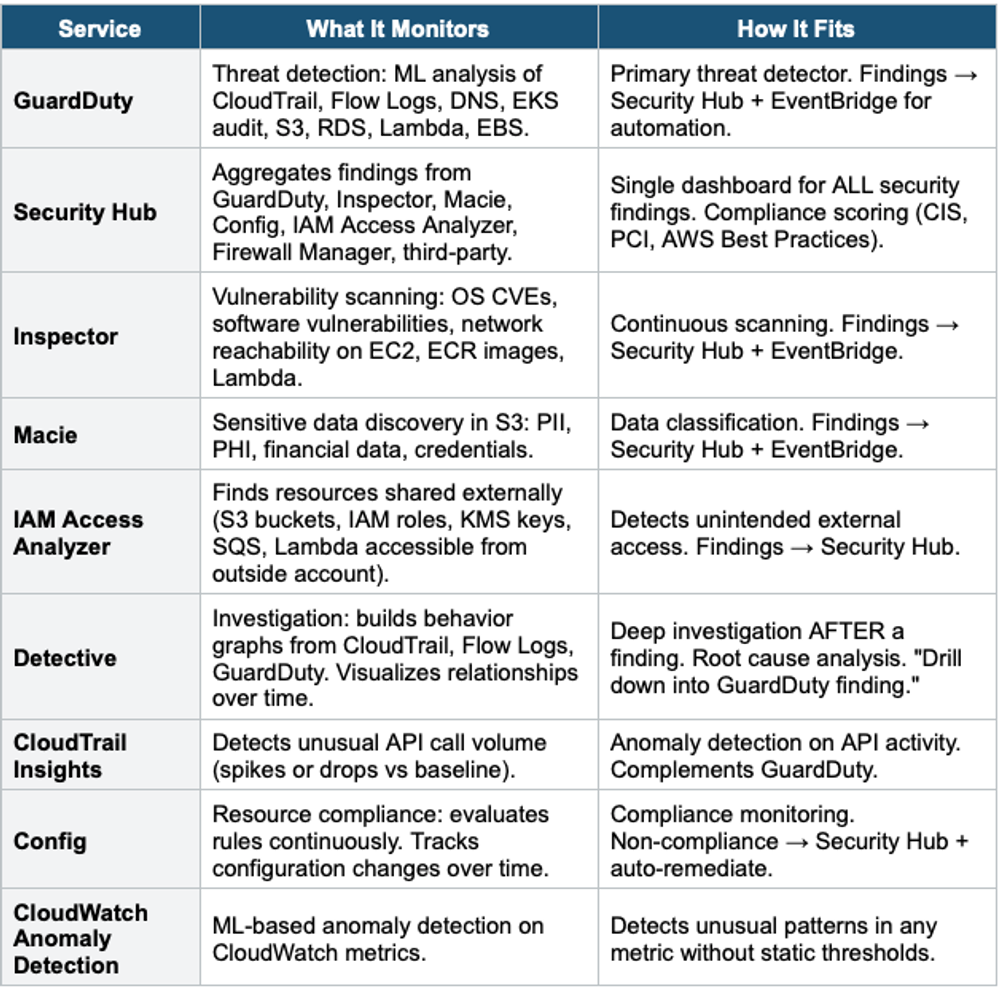
7. Security Hub Deep Dive
How Security Hub Aggregates
Security Hub Aggregation:

  Sources → Security Hub:
    GuardDuty findings     ─┐
    Inspector findings     ─┤
    Macie's findings         ─┤
    Config compliance      ─┼──→ Security Hub
    IAM Access Analyzer    ─┤     (centralized)
    Firewall Manager       ─┤         |
    Third-party (CrowdStrike, etc.) ┘  |
                                      |
  Security Hub Outputs:
    • Security Score (0-100% per standard)
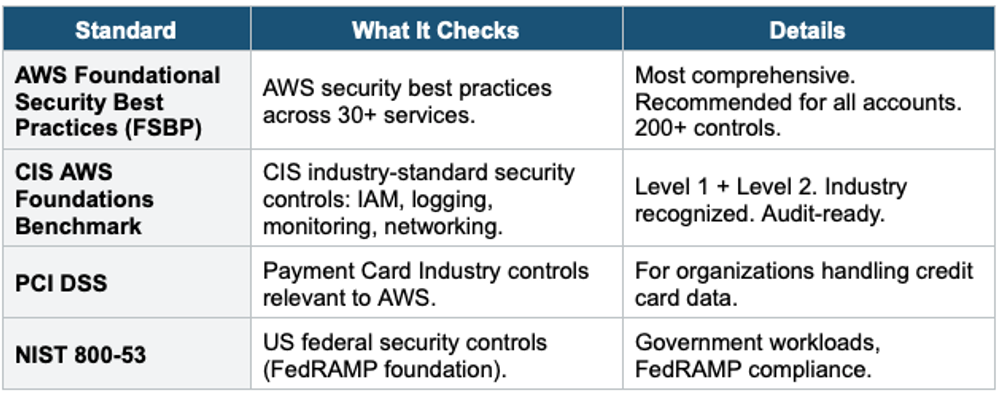
    • Compliance: CIS, PCI DSS, AWS Best Practices, NIST
    • Findings: normalized ASFF format
    • EventBridge: automate responses
    • Custom Actions: analyst-triggered automation
    • Cross-Region aggregation: one Region shows all findings
Security Hub Standards
8. Log Protection & Integrity
9. SIEM Integration
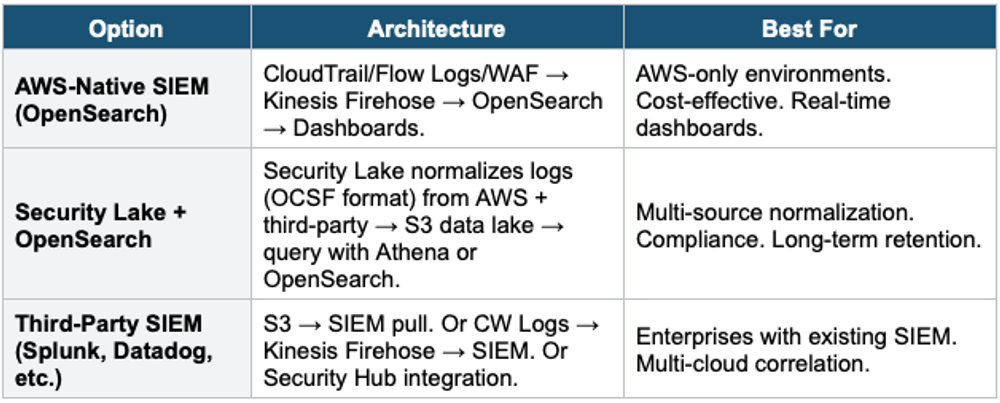
Security Information and Event Management (SIEM) systems aggregate, correlate, and analyze security events from multiple sources.
Amazon Security Lake
- Centralizes security data from AWS and third-party sources into an S3 data lake
- Normalizes ALL data to the OCSF (Open Cybersecurity Schema Framework) standard format
- Sources: CloudTrail, VPC Flow Logs, Route 53 DNS, Security Hub, S3 access logs, Lambda, EKS + third-party
- Query with: Athena, OpenSearch, or feed to third-party SIEM
- Automatic data management: partitioning, compression, lifecycle
- Cross-account + cross-Region aggregation
- Use for: centralized security data lake, normalize disparate log formats, long-term security analytics
10. Complete Security Monitoring Architecture
Enterprise Security Monitoring Architecture:

  ALL ACCOUNTS (via Organizations):

  Detection:
    GuardDuty (org-wide, delegated admin)
    Inspector (org-wide, continuous scanning)
    Macie (org-wide, scheduled S3 scans)
    Config (org-wide, aggregator in Security account)
    IAM Access Analyzer (org-wide)
    CloudTrail Insights (anomaly detection)

  Aggregation:
    Security Hub (cross-Region aggregation, delegated admin)
      → CIS, FSBP, PCI DSS, NIST compliance scoring
      → Single dashboard for ALL findings across ALL accounts

  Logging:
    CloudTrail Organization Trail → Log Archive S3 (Object Lock)
    VPC Flow Logs (all VPCs) → Log Archive S3 or CW Logs
    Security Lake: normalize all logs (OCSF) → S3 data lake

  Investigation:
    Detective: visualize entities + relationships
    Athena: SQL queries on CloudTrail / Flow Logs in S3
    CloudTrail Lake: SQL on CloudTrail events (managed)

  Automation:
    EventBridge: route findings → Lambda/SSM/Step Functions
    Config auto-remediation: SSM Automation runbooks
    Security Hub Custom Actions: analyst-triggered response

  Dashboards:
    Security Hub Console (compliance scores)
    OpenSearch Dashboards (real-time log analytics)
    QuickSight (executive security reports)
Exam Tip Security Logging: "Centralize ALL logs" = Log Archive Account + S3 Object Lock. "Protect logs from deletion" = Object Lock (WORM) + cross-account + deny-delete bucket policy. "Detect threats" = GuardDuty (primary). "Aggregate findings" = Security Hub. "Investigate" = Detective + Athena. "Compliance scoring" = Security Hub standards (CIS, FSBP). "Normalize logs" = Security Lake (OCSF). "Real-time dashboards" = OpenSearch. "Metric filters" = CW Logs (root login, SG changes, etc.). CloudTrail = multi-Region + Organization + log validation + KMS + data events.